
Phyn
Phyn LLCHouse & Home
3.6203.00 Reviews
- Version
- 8.25.1
- Installs
- 10.00K
- Age Rating
- Everyone
Screenshots
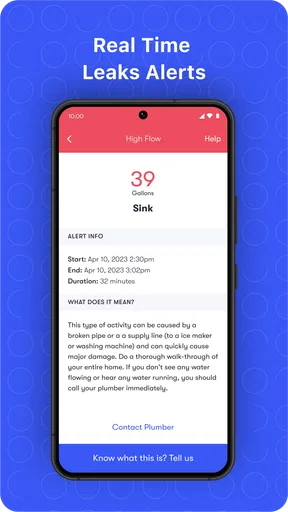
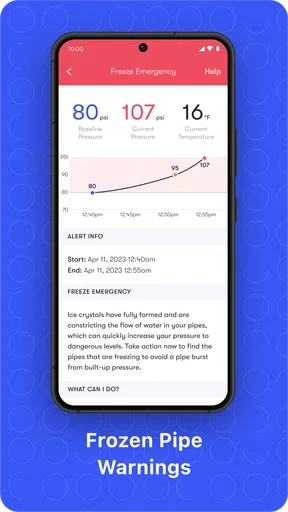
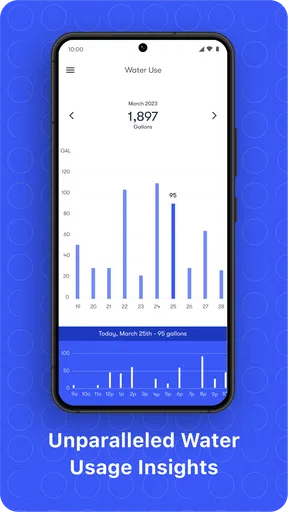
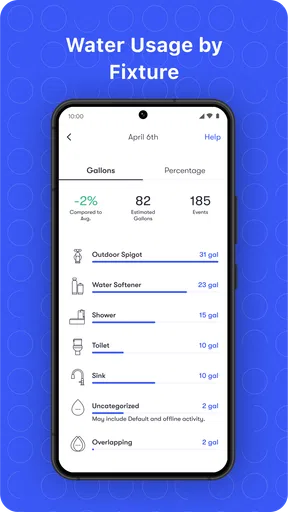
Our Review of Phyn
 Analysis by Appyee
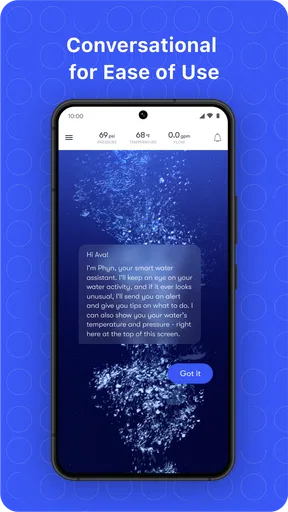
I spend a lot of time thinking about water only after something goes wrong: a damp cabinet, a strange sound behind a wall, or a utility bill that looks higher than expected. Phyn is designed for the more useful moment before that panic. It is a free House & Home app from Phyn LLC that works as a smart water assistant, giving connected Phyn hardware a place to report what is happening in a home’s water system.
After using it, my view is that Phyn makes the most sense as part of a broader setup rather than as a standalone utility. The app itself is not a magic leak detector that can inspect every pipe through a phone. Its value comes from turning information from compatible Phyn equipment into something I can understand and act on. That distinction matters, because it shapes both the app’s strengths and its limits.
How Phyn feels in everyday use today
The current app is aimed at homeowners who want more awareness around water use and possible leaks without constantly checking valves, meters, or plumbing fixtures. The interface is built around the idea that unusual water behavior should become visible enough for a person to investigate. In practical terms, I would use it to check the state of the home, review activity, and respond when something appears out of the ordinary.
That is a different experience from a conventional utility app. A utility account usually tells me what I was billed for over a broad period, while Phyn is intended to bring water information closer to the moment it happens. It also differs from a basic smart-home dashboard that merely shows whether a device is online. The useful question here is not only “is the hardware connected?” but “does the water behavior look normal for this home?”
I found that distinction especially helpful when thinking about quiet problems. A burst pipe is dramatic and usually obvious. A toilet that keeps refilling, a slowly dripping fixture, or water usage continuing while everyone is asleep can be much harder to notice. A smart water assistant can give those patterns a better chance of being spotted before they become expensive damage.
Still, I would not install the app expecting it to replace a plumber’s inspection. It can help me notice a suspicious situation and organize my response, but it cannot physically examine a hidden pipe, determine the exact source of every irregularity, or repair anything. The best results come when I treat its information as an early warning and then verify the situation in the house.
The setup depends on the hardware
The first practical question is whether Phyn fits my home’s equipment. The app’s usefulness depends on having compatible Phyn hardware installed and connected. Without that equipment, there is little reason to keep the app on a phone. This is an important difference from budgeting tools or general household apps that provide value immediately after installation.
For someone already using Phyn equipment, the app acts as the everyday control and observation layer. I can check information without walking to the installation point, which is useful when the device is located in a utility space, basement, garage, or another area I do not visit often. For a new buyer, however, the phone download is only one part of the decision. The hardware, installation requirements, home network, and the effort of learning the system all matter just as much.
I also recommend setting it up when I have time to observe normal household behavior rather than doing it during a plumbing emergency. A home has many legitimate changes in water use: a shower, a washing machine, irrigation, guests, or a newly installed appliance. Understanding the ordinary rhythm makes unusual activity easier to judge later.
A realistic morning-to-evening scenario
Imagine leaving for work after running the dishwasher and taking a shower. Later, Phyn shows water activity during a period when the house should be quiet. I would not immediately assume the worst. My first step would be to check whether a toilet is running, a tap was left slightly open, or an appliance is operating on a schedule. If nothing explains the activity, I would inspect visible plumbing and decide whether to contact a professional.
That workflow is where the app becomes genuinely useful. It changes the response from “I hope nothing is wrong” to “there is a reason to investigate, and I have a starting point.” If I am away from home, the same awareness could help me ask a neighbor or family member to look sooner than they otherwise would. The app cannot guarantee that damage will be prevented, but earlier awareness is a meaningful advantage.
There is also a less dramatic use case. I might notice that water activity regularly continues late at night. Instead of waiting for a large bill or visible moisture, I can compare the timing with household routines and inspect toilets, outdoor connections, and appliances. This kind of pattern-based checking is more valuable than a single glance at a monthly total.
What the current version says about Phyn’s direction
The app has been available since March 31, 2018, and the current version is 8.25.1. Those details suggest an established product rather than a brand-new experiment, but I would still separate that history from assumptions about what the latest update changed. A version number alone does not prove that a particular feature was added, redesigned, or improved, so I judge the present experience by how well the app supports the core water-monitoring job.
What I can say with confidence is that the product has evolved into a mature companion for smart water management, not merely a setup screen for a connected device. Its ongoing relevance depends on keeping the experience understandable as homes become more complicated. People need to know what is happening, why it may matter, and what action is sensible next.
For existing users, the most important effect of a newer app version is not necessarily a flashy visual change. It is whether checking the home feels dependable and whether alerts or activity information are clear enough to use under pressure. Water problems are time-sensitive, so confusing wording, delayed awareness, or a hard-to-find status screen can undermine the entire point of the system.
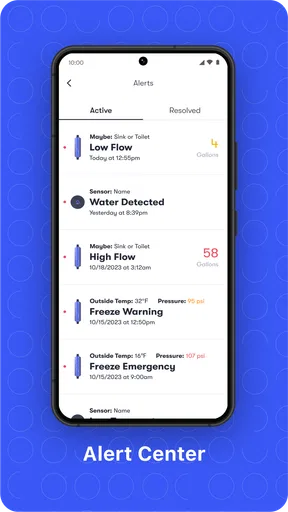
I also think product evolution should be judged by how well it handles the difference between an alert and a diagnosis. A useful app can point out behavior that deserves attention. It should not encourage me to treat every notification as proof of a leak. The best experience gives enough context to reduce unnecessary panic while still making serious situations difficult to ignore.
Why the rating deserves context
Phyn has an average rating of 3.6 from roughly seven hundred ratings, with over two hundred written reviews. I read that as a sign that the experience is useful for some households but not universally smooth. For a connected-home app, that mixed response is understandable: success depends not only on the phone software but also on installation, connectivity, plumbing layouts, device compatibility, and how clearly the system communicates unusual activity.
A rating like this should not automatically discourage someone who already owns compatible Phyn equipment. The relevant question is whether the app solves a problem that matters in that particular home. At the same time, I would not dismiss the criticism implied by a middling average. Anyone expecting a completely effortless smart-home experience should be prepared for setup work and occasional troubleshooting.
The app has more than ten thousand installs, which gives it a real user base without making it feel like a universal household standard. I see that as a reason to approach it as a specialized tool. It is built for people who care enough about water awareness to use dedicated equipment, not for every phone owner looking for a casual home utility.
Small decisions that make the system more useful
One useful habit is to create a personal baseline. I would check the app at different times of day for several ordinary days and mentally connect the activity with showers, laundry, cooking, cleaning, and outdoor use. This is more informative than judging one isolated event. The non-obvious benefit is that I become better at recognizing the difference between a normal household spike and water use that continues without a clear reason.
A second habit is to investigate alerts in layers. I would first ask who is home and what is running, then check toilets and visible fixtures, and only after that consider less accessible plumbing. This prevents the app from turning every notification into an emergency while preserving a clear escalation path. If water is still active when the home should be quiet, I would take the situation more seriously.
A third is to use the app as part of a household handoff plan. If several people live in the home, everyone should know what a warning means and who checks the plumbing first. When I am traveling, a trusted person should know where the main shutoff is and how to reach a plumber. The app can improve awareness, but preparedness determines whether awareness becomes useful action.
I would also avoid judging the system solely by whether it catches a dramatic leak. Its quieter value may be helping me notice recurring waste, understand when water is being used, and build better maintenance habits. That is less exciting than a rescue story, but it is a more realistic reason to keep using a smart water tool.
Where Phyn is stronger than ordinary alternatives
Compared with relying on a monthly water bill, Phyn offers a much closer view of household activity. A bill can reveal that consumption was high, but it usually does not tell me when the change happened or what to inspect first. Phyn’s connected approach is better suited to early investigation and ongoing awareness.
Compared with a basic moisture sensor placed under a sink, it can address a different kind of risk. A moisture sensor waits for water to reach one particular spot. A smart water system can help me think about activity across the home, including situations where water is being used continuously but has not yet pooled visibly. That broader perspective is the main reason I would choose it over a handful of inexpensive sensors.
Those alternatives are not useless, though. A local moisture sensor may be cheaper and simpler for a single vulnerable appliance. It may also continue to be valuable alongside Phyn because it watches a physical location directly. If my concern is only a washing-machine hose or a basement corner, a focused sensor could be the more sensible purchase.
A smart water assistant also differs from manually reading a meter. Manual checks can be informative, but they require discipline and provide only occasional snapshots. Phyn is better for someone who wants the monitoring process to fit into normal phone use rather than a recurring household chore.
What still creates friction
The biggest limitation is the dependency on dedicated hardware. The app cannot deliver its full purpose through software alone, so the total cost and complexity of the solution are larger than the word “free” might suggest. The app itself costs nothing, but I would evaluate the complete Phyn setup before deciding whether it is worthwhile.
There is also a learning curve around interpretation. Water behavior is not always intuitive, and a household with irregular schedules may produce activity that looks suspicious even when everything is fine. I would prefer to spend time learning the home’s normal patterns rather than reacting to every change. People who want simple, instantly obvious answers may find this frustrating.
Connectivity is another practical consideration for any smart-home product. If the phone, home network, or installed equipment has a problem, confidence in the system can drop quickly. I would not make it my only safety plan. Knowing the physical main shutoff and checking vulnerable areas still matter, especially during travel or severe weather.
Privacy and trust also deserve a personal decision. Water-use information can reveal routines, occupancy, and unusual activity. I would only use the app if I felt comfortable with the connected setup and understood who in the household should have access. That is not a reason to reject Phyn automatically, but it is part of responsible smart-home ownership.
Who should use it and who should skip it
Phyn is a strong match for a homeowner who already has compatible Phyn equipment, worries about hidden leaks, travels regularly, or wants a clearer view of household water behavior. It is particularly appealing when a home has multiple occupants and it is difficult to know whether water use is normal at any given moment.
I would also recommend considering it for someone managing an older property, provided the installation is suitable. In that situation, earlier awareness can be more valuable than another general-purpose home dashboard. The app gives water concerns their own place instead of burying them among lighting, security, and entertainment controls.
I would skip it if I only need to monitor one sink, appliance, or visible leak-prone area. A small local sensor may be easier and less involved. I would also skip it if I am renting and cannot install the required equipment, or if I am unwilling to maintain a connected home system. The app is not a good fit for someone looking for a standalone download with immediate benefits.
It is also not the right choice if I expect a phone notification to replace emergency planning. No app should be treated as a guarantee against water damage. Phyn can support a response, but I still need a shutoff plan, sensible maintenance, and professional help when the cause is unclear.
What I would watch as the product continues
For future updates, I would pay attention to clarity more than novelty. The most valuable improvements would make unusual activity easier to interpret, reduce uncertainty during an alert, and help households distinguish routine use from a possible problem. I would also look for a smoother experience when several people share responsibility for the home.
I would watch how well the app serves both experienced users and someone opening it during their first suspected leak. A mature product should not force people to remember technical details when they are worried. Clear history, understandable explanations, and a direct path from warning to sensible next step would matter more to me than decorative redesigns.
I would also want the product’s evolution to preserve trust. If the app becomes more capable, it should remain honest about the difference between detecting unusual water behavior and identifying a confirmed plumbing failure. That boundary is important because overconfident alerts create fatigue, while vague alerts create hesitation.
On the technical side, I would judge future versions by reliability across ordinary household conditions: changing schedules, intermittent connectivity, guests, outdoor use, and appliances that operate without supervision. These are the situations that determine whether a smart water assistant becomes a daily safety net or an app I forget to open.
My final take after living with the idea
I see Phyn as a focused tool with a sensible purpose. It brings water awareness closer to everyday life and can help me investigate suspicious activity earlier than a bill, a manual meter check, or a single moisture sensor. Its best quality is not that it makes plumbing effortless; it gives a homeowner more information at the moment information may matter.
The trade-off is that the experience depends on compatible hardware, a willingness to learn normal usage, and a realistic understanding of what alerts can prove. The free app is attractive, but the complete decision belongs to the connected system, not the download alone. I would recommend it to the right homeowner, especially one who values early warning and already has the Phyn setup it supports.
For me, the deciding question is simple: do I want a specialized view of water activity, or do I only need a basic sensor in one place? If the answer is the former, Phyn is worth considering. If the answer is the latter, a simpler alternative may be more practical. As a smart water assistant, Phyn is most valuable when I use its information as a prompt for informed action, not as a substitute for looking after the house.
The app is free, rated for Everyone, and currently listed as version 8.25.1 for devices running iOS 12 or later. Those details make it accessible to many users, but accessibility should not be confused with universal suitability. I would install it when the home’s water risks justify dedicated monitoring, prepare a response plan before an alert arrives, and keep expectations grounded in what connected water information can realistically do.
Verdict
Strengths of Phyn
- Real-time water monitoring helps detect unusual usage quickly.
- Automatic shutoff can limit damage from major leaks.
- Installation works with many existing home plumbing systems.
- Usage history makes it easier to identify wasteful water habits.
- Mobile alerts keep you informed even when you are away.
Limitations of Phyn
- Requires professional installation and access to the main water line.
- Some features depend on a stable Wi-Fi connection.
- The upfront device and installation cost may be high.
- Not every plumbing setup is compatible with the system.
- False alerts may occur during unusual but harmless water usage.
Similar Picks in This Category
View All
Universal TV Remote Control
CodeMatics Media Solutions3.9

AlfredCamera Home Security app
Alfred Systems Inc.4.7

Planner 5D: AI Home Design
Planner 5D4.5

Universal Tv Remote-Cast to TV
One Music Player4.1

Zillow: Homes for Sale & Rent
Zillow Group4.8

99acres Buy/Rent/Sell Property
infoedge.com4.3
Frequently Asked Questions
What is Phyn, and what does the app do?
Phyn is a smart water-monitoring and leak-detection system that works with compatible Phyn hardware installed in your home. The app gives you access to water-use information, alerts, and device controls from your Android or iOS phone. Depending on your setup, it can help identify unusual flow, possible leaks, pressure issues, and other plumbing-related events before they become expensive problems.
Do I need Phyn hardware to use the Phyn app?
Yes, the app is designed primarily to work with Phyn devices, such as a Phyn Plus smart water assistant or compatible Phyn sensors. Installing the app alone will not provide meaningful water monitoring or leak protection. During setup, you generally need to create an account, connect the hardware to your home Wi-Fi network, and follow the installation and calibration instructions so the system can learn your household’s normal water patterns.
How reliable are Phyn’s leak alerts and water monitoring features?
Phyn can be very useful for detecting abnormal water activity, but it should not be treated as an infallible replacement for regular plumbing inspections. Its performance depends on correct installation, a stable internet connection, accurate device configuration, and the type and location of the leak. The app can send notifications about suspected problems, while some smaller, hidden, or intermittent leaks may require additional investigation.
Does Phyn require a subscription or ongoing fees?
The cost structure can depend on the specific Phyn product, region, retailer, and any optional services available at the time you purchase it. The hardware is usually the primary expense, while app access and core monitoring features may be included with the device. Before buying, check the current product page or app information for installation charges, optional plans, replacement parts, and any features that may require an additional subscription.
Is Phyn easy to install and suitable for every home?
The Phyn app provides guided setup and can make configuration easier, but the physical installation may require plumbing knowledge because some systems connect to the home’s main water line. Many users may prefer a licensed plumber, especially when modifying existing pipes or installing equipment in a difficult location. Compatibility can also depend on pipe size, water-system layout, Wi-Fi coverage, and whether the selected Phyn model is supported in your area.
